Taxi Booking Widget for Existing Operator Websites
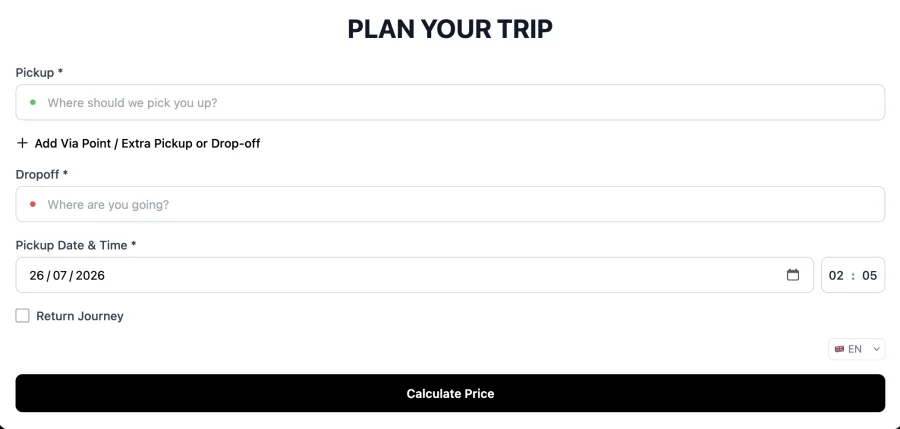
A taxi booking widget is an embeddable form that lets customers book directly from your existing website. The CabZen widget installs with a single line of code and prices journeys live using your own rates, fixed routes and surcharges.
Turn your current website into a booking channel with an embedded widget that captures customer journey details and connects them to your CabZen account.
Last reviewed October 6, 2026 by the CabZen product team.
CabZen in numbers
The cost and commitment questions operators ask first, answered before you read any further.
| Starting price | £35 per month |
|---|---|
| Plans | Starter £35 (5 drivers) · Business £70 (20 drivers) |
| Commission per ride | None. Flat monthly fee only |
| Free trial | 14 days, no credit card required |
| Contract | Month to month, cancel anytime |
| Extra drivers | £4 per driver, per month, up to 50 vehicles |
| 50+ vehicles | Quoted individually on dedicated infrastructure |
| Dispatch modes | Manual, auto-dispatch and job auction |
| Driver app | Native iOS and Android, included free |
| Included emails | 1,000 per month |
| Setup | Self-serve, or done-for-you for £30 one-off |
Who this page is for
Operators with an established website
Businesses that already rank or advertise locally and want visitors to book directly.
Airport transfer pages
Transfer operators that need quote and booking forms on high-intent service pages.
Teams avoiding a website rebuild
Companies that want online booking without replacing the rest of their site.
Operational coverage
Website conversion
Booking capture
Operational connection
Putting it in place, and what to ask
A realistic order to set things up in, and the questions worth putting to any supplier before you commit.
Implementation playbook
Vendor decision checklist
What it costs
Every feature on both plans. The only difference is how many drivers you need. No commission on any ride, on either plan.
5 drivers included. Extra drivers £4 each per month, up to 50 vehicles.
20 drivers included. Same features, more capacity.
Optional add-ons: extra booking platforms £15/month, branded driver app £350 one-off, CabZen X priced to your fleet. See the full pricing page.
How do I add the widget to my website?
You copy a short embed snippet from your dashboard and paste it into the page where you want the form to appear. It works in WordPress, Wix, Squarespace and hand-built sites, and needs no developer to install.
Will it match my website design?
The widget uses your branding and sits inside your own page layout, so visitors stay on your site throughout. It is not a redirect to a third-party booking portal, which means your traffic and your customer relationship stay with you.
Does the widget quote real prices?
Yes. It prices live from the rates configured in your account, including fixed routes, minimum fares and any surcharges that apply. The figure a customer sees is the figure you set, not an estimate calculated by a third party.
What size should the widget be?
Allow at least around 540 pixels of height so the form is not cut off, and let the width fill its container. On a page builder such as Divi, set a minimum height on the row or code module holding the embed.
Can I put it on more than one page?
Yes. The same snippet can be used on as many pages as you like, so you can place it on your home page, on individual service pages and on airport landing pages without any extra configuration.
Where do bookings from the widget go?
Straight onto your dispatch board, exactly as though they had come through your main booking page. The customer gets the same confirmation and tracking link, and you get the same notification, so nothing is handled differently.
Does it work on mobile?
Yes. The widget adapts to the width it is given, so on a phone it renders as a single narrow column with full-size fields. Most customers book on mobile, so this is the case it is designed around.
Can I run the widget and a booking page at once?
Yes. Many operators embed the widget on their existing marketing site and also use the branded booking page for links in emails, social posts and Google listings. Both feed the same account and the same dispatch board.
Ready to switch or start fresh?
Launch your booking and dispatch workflows with a 14-day free trial.
Start your free trial